A Normal Captcha is an image containing distorted—but human-readable—text. To solve it, the user must correctly type the text shown in the image.
With CaptchaAI, you can automate this process by submitting the image to our API. The service accepts images in either multipart form or Base64-encoded format. We also offer custom image modules
Here is a polished, documentation-friendly addition that fits your existing style and clearly explains the custom image modules:
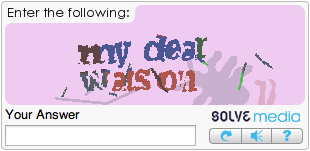
We also offer a collection of specialized custom image modules, each trained to solve a specific CAPTCHA type with higher accuracy. Using a module tailored to the CAPTCHA you are targeting is often the best and most reliable approach, especially for uncommon or highly distorted image CAPTCHAs.
You can browse the full updated list of available modules and even test all modules to see which one solves your target CAPTCHA type most effectively (requires signup):
- Prepare the image:
- Ensure it meets requirements (size: 1 KB - 1 MB; format: JPG, PNG, GIF).
Optional (Recommended): Test custom modules on a sample iamge and use the best one for higher accuracy.
- Submit the CAPTCHA:
- For API V1: Send a POST request to the
in.phpendpoint with your image and parameters.
→ See API V1 – Normal Captcha - API V2 COMING SOON
- For API V1: Send a POST request to the
- Receive a task ID (e.g.,
1234567890) in the response. - Wait 1 to 3 seconds, then poll for the result:
- In API V1: Use the
res.phpendpoint with your task ID.
→ See API V1 – Get Result - API V2 COMING SOON
- In API V1: Use the
- Handle the response:
- If the solution is ready, extract the text.
- If the status is “not ready,” wait 1 seconds and retry.