CaptchaFox beta
CaptchaFox is an interactive CAPTCHA that typically requires users to complete a browser-based challenge before access is granted. CaptchaAI automates this process by analyzing the challenge and returning the token needed to bypass verification.
Overview
CaptchaFox commonly appears as:
- Interactive challenge - Solve a browser-rendered verification flow
- Network-loaded challenge - A request to the CaptchaFox API reveals the sitekey
- Token-based verification - The response is a token that must be submitted back to the site
- Returns a single token plus a User-Agent that should be matched when submitting
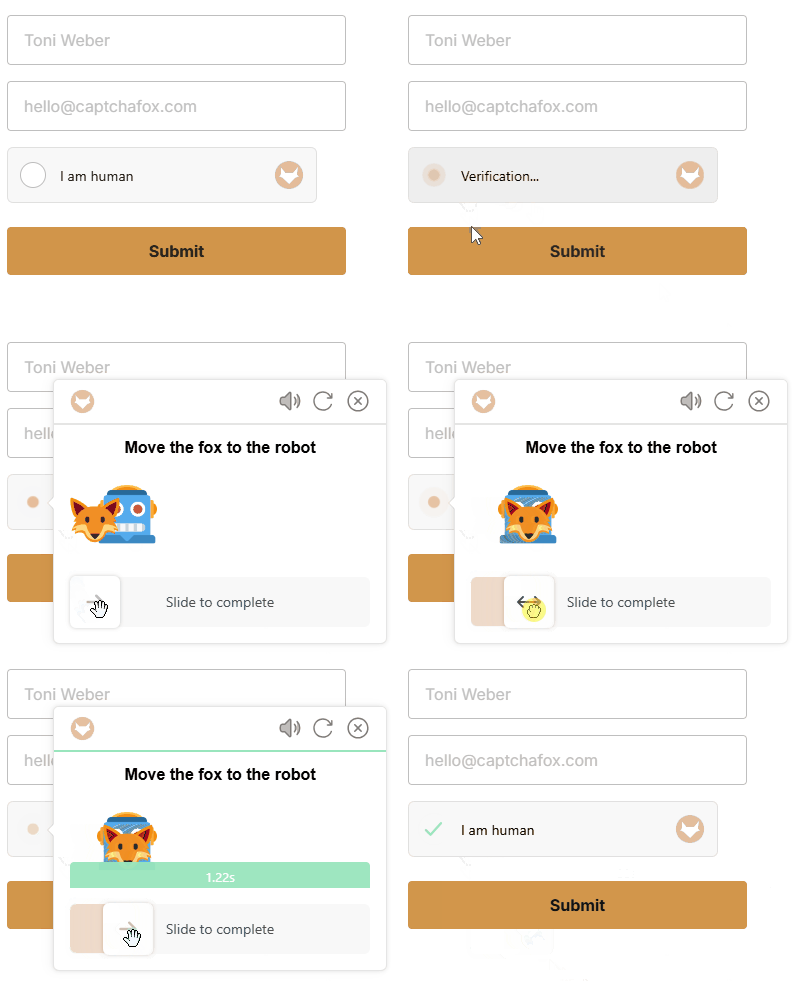
Example: CaptchaFox challenge flow
How to Solve CaptchaFox
Step 1: Extract the Sitekey
Open the browser Network tab and trigger the CaptchaFox challenge. Look for a request named challenge.
The sitekey is the value in the request URL between https://api.captchafox.com/captcha/ and /challenge.
Example URL:
https://api.captchafox.com/captcha/sk_bo3q016TDv4Jey6fibTVChVS9z-cYdCO/challenge
In this example, the sitekey is sk_bo3q016TDv4Jey6fibTVChVS9z-cYdCO.
Step 2: Submit the Task to CaptchaAI
Send a GET request to https://ocr.captchaai.com/in.php with the CaptchaFox parameters:
import requests

params = {
		'key': 'YOUR_API_KEY',
		'method': 'captchafox',
		'pageurl': 'https://example.com/login',
		'sitekey': 'sk_bo3q016TDv4Jey6fibTVChVS9z-cYdCO',
		'proxy': 'user:[email protected]:8080',
		'proxytype': 'HTTP',
		'json': '1'
}

response = requests.get('https://ocr.captchaai.com/in.php', params=params)
result = response.json()
task_id = result['request']
print(f'Task ID: {task_id}')
⚠️ CRITICAL: You must include your own proxy and use that same proxy in the submission step.
Step 3: Retrieve the Solution
Wait for the task to complete, then poll https://ocr.captchaai.com/res.php for the result:
import time
import requests

time.sleep(15)

params = {
		'key': 'YOUR_API_KEY',
		'action': 'get',
		'id': task_id,
		'json': '1'
}

response = requests.get('https://ocr.captchaai.com/res.php', params=params)
result = response.json()

if result['status'] == 1:
		token = result['request']
		user_agent = result.get('user_agent')
		print(f'Token: {token}')
		print(f'User-Agent: {user_agent}')
⚠️ CRITICAL: You must use the user agent returned by the /res.php
Step 4: Submit the Token
Use the returned token to complete the target website's verification flow. If the response includes a user_agent, send the token with that same User-Agent header.
headers = {
		'User-Agent': user_agent
}

data = {
		'captchafox_token': token
}

response = requests.post('https://example.com/api/verify', headers=headers, data=data)
print(response.text)
Response Format
JSON Response (with json=1):
{
	"status": 1,
	"request": "0cAFcWeA7RO4a8OGOwOQ9...Ew9fQvkJ46JRE8w",
	"user_agent": "Mozilla/5.0 (Windows NT 10.0; Win64; x64) AppleWebKit/537.36 (KHTML, like Gecko) 144.0.7559.96 Safari/537.36"
}
The response contains two important values:
request- The CaptchaFox token to submit back to the siteuser_agent- The User-Agent that should be used when sending the token
Common Errors
- ERROR_WRONG_USER_KEY: API key is invalid or incorrectly formatted.
- ERROR_KEY_DOES_NOT_EXIST: API key does not exist.
- ERROR_ZERO_BALANCE: Account balance is too low to process the task.
- ERROR_PAGEURL:
pageurlis missing. Provide the full page URL. - ERROR_WRONG_CAPTCHA_ID:
sitekeyis invalid or does not match the challenge. - CAPCHA_NOT_READY: The solution is not ready yet. Wait and poll again.
For complete error documentation, see the Error Handling Guide.
Tips & Best Practices
Tip: Always capture the
sitekeyfrom the live network request, not from cached page source.
Tip: Use the exact
pageurl, including query parameters, to match the original challenge context.
Tip: If the API returns a
user_agent, reuse it when submitting the token to the target site.
Tip: Proxy settings are required for this task type. Make sure
proxyandproxytypeare valid.
API Reference
For complete API specifications and advanced options, visit the CaptchaAI API Documentation and select CaptchaFox from the sidebar.