BLS Captcha
BLS is a CAPTCHA type that presents a 3×3 grid of images with a numeric instruction code specifying which images to select. CaptchaAI analyzes each cell and returns the indices of tiles that match the instruction.
Overview
BLS Captcha typically appears with:
- A 3×3 grid containing 9 image cells
- A numeric instruction code (e.g., 664, 123, 546) that specifies what to select
- Returns an array of indices (1–9) of cells matching the instruction
- Cells are numbered left-to-right, top-to-bottom
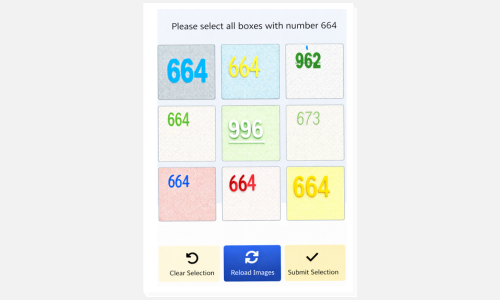
Example: A 3×3 BLS captcha asking to "select all boxes with number 664"
How to Solve BLS Captcha
Step 1: Prepare the Grid Images and Instruction
- Extract all 9 images from the grid as separate images
- Convert each image to Base64 data URI format:
data:image/gif;base64,R0lGODlh... - Identify the numeric instruction code (e.g., 664, 123, 546)
The grid cells are numbered in reading order:
1 2 3
4 5 6
7 8 9
Step 2: Submit the Task to CaptchaAI
Send a POST request to https://ocr.captchaai.com/in.php with all 9 images and the instruction code.
import requests

# Prepare the data
data = {
    'key': 'YOUR_API_KEY',
    'method': 'bls',
    'instructions': '664',
    'json': '1'
}

# Add all 9 base64 images
files = {f'image_base64_{i+1}': (None, images[i]) for i in range(9)}

response = requests.post('https://ocr.captchaai.com/in.php', data=data, files=files)
result = response.json()
task_id = result['request']
Step 3: Retrieve the Solution
Wait 5 seconds, then poll for the result using a GET request to https://ocr.captchaai.com/res.php:
import time
import json

time.sleep(5)  # Wait 5 seconds

params = {
    'key': 'YOUR_API_KEY',
    'action': 'get',
    'id': task_id,
    'json': '1'
}

response = requests.get('https://ocr.captchaai.com/res.php', params=params)
result = response.json()

if result['status'] == 1:
    solution = json.loads(result['request'])  # e.g., [1, 4, 7, 8]
    print(f"Selected cells: {solution}")
Step 4: Apply the Solution
The response contains an array of cell indices (1–9) that match the instruction. For example:
[1, 4, 7, 8]means cells 1, 4, 7, and 8 contain the matching pattern- Click or select these cells to complete the captcha
Response Format
JSON Response (with json=1):
{
  "status": 1,
  "request": "[1, 4, 7, 8]"
}
Plain Text Response:
OK|[1, 4, 7, 8]
Common Errors
- ERROR_BAD_PARAMETERS: Missing images or invalid instruction format. Ensure all 9 images are provided as valid Base64 data URIs.
- ERROR_ZERO_BALANCE: Insufficient account balance. Top up your account to continue.
- CAPCHA_NOT_READY: Solution not ready yet. Wait 5 seconds and poll again.
For complete error documentation, see the Error Handling Guide.
Tips & Best Practices
Tip: Always encode images as data URIs with the correct prefix:
data:image/gif;base64,ordata:image/png;base64,
Tip: Use
json=1parameter for structured responses that are easier to parse
Tip: Ensure the instruction code is numeric and matches the BLS system format
API Reference
For complete API specifications and advanced options, visit the CaptchaAI API Documentation and select BLS Captcha from the sidebar.
Related Guides
- Grid Image Recognition - Similar 3×3 grid solving method
- Normal Captcha - Simple image-to-text recognition
- Error Handling - Complete error codes and solutions