Normal Captcha
A Normal Captcha is an image containing distorted—but human-readable—text. CaptchaAI analyzes the image and returns the text solution, allowing you to automate basic text-based captcha challenges.
Overview
Normal Captcha is one of the most basic yet common CAPTCHA types:
- Distorted text images with letters and/or numbers
- Case-sensitive or case-insensitive text
- Single or multiple words in the image
- Numeric-only or alphanumeric combinations
- Commonly seen in Solve Media, legacy reCAPTCHA v1, Facebook, and custom implementations
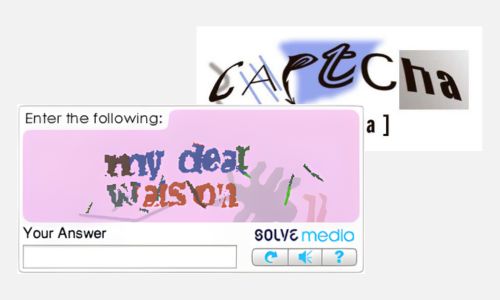
Example: Normal captcha with distorted text
How to Solve Normal Captcha
Step 1: Prepare Your Image
Ensure your captcha image meets these requirements:
- Size: Between 100 bytes and 100 KB
- Format: JPG, JPEG, PNG, or GIF
- Content: Clearly visible (though distorted) text or numbers
Step 2: Submit the Task to CaptchaAI
Send a POST request to https://ocr.captchaai.com/in.php with the captcha image.
import requests

# Using file upload
with open('captcha.jpg', 'rb') as f:
    files = {'file': f}
    data = {
        'key': 'YOUR_API_KEY',
        'method': 'post',
        'json': '1'
    }

    response = requests.post('https://ocr.captchaai.com/in.php', files=files, data=data)
    result = response.json()
    task_id = result['request']
Step 3: Retrieve the Solution
Wait 5 seconds, then poll for the result using a GET request to https://ocr.captchaai.com/res.php:
import time

time.sleep(5)  # Wait 5 seconds

params = {
    'key': 'YOUR_API_KEY',
    'action': 'get',
    'id': task_id,
    'json': '1'
}

response = requests.get('https://ocr.captchaai.com/res.php', params=params)
result = response.json()

if result['status'] == 1:
    solution = result['request']  # e.g., "ABC123"
    print(f"Captcha text: {solution}")
Step 4: Apply the Solution
The response contains the detected text from the captcha image:
- Enter the text into the target form field
- Submit the form to complete the verification
Response Format
JSON Response (with json=1):
{
  "status": 1,
  "request": "ABC123"
}
Plain Text Response:
OK|ABC123
Common Errors
- ERROR_WRONG_FILE_EXTENSION: Unsupported image format. Use JPG, JPEG, PNG, or GIF.
- ERROR_ZERO_CAPTCHA_FILESIZE: Image size less than 100 bytes. Check and resize your image.
- ERROR_TOO_BIG_CAPTCHA_FILESIZE: Image size more than 100 KB. Compress your image.
- ERROR_ZERO_BALANCE: Insufficient account balance. Top up your account to continue.
- CAPCHA_NOT_READY: Solution not ready yet. Wait 5 seconds and poll again.
For complete error documentation, see the Error Handling Guide.
Tips & Best Practices
Tip: Use
json=1parameter for structured responses that are easier to parse
Tip: For case-sensitive captchas, add
regsense=1parameter to improve accuracy
Tip: If captcha contains only numbers, add
numeric=1for better results
Tip: Use high-quality images without compression artifacts for best accuracy
API Reference
For complete API specifications and advanced options, visit the CaptchaAI API Documentation and select Normal Captcha from the sidebar.
Related Guides
- Grid Image Recognition - For grid-based image captchas
- reCAPTCHA V2 - For Google reCAPTCHA
- Error Handling - Complete error codes and solutions