Geetest V3
Geetest V3 is an interactive CAPTCHA that typically requires users to either drag a puzzle piece into place or select images in a specific sequence. CaptchaAI automates this process by analyzing the challenge and returning the correct response values needed to bypass verification.
Overview
Geetest V3 commonly appears as:
- Slide Puzzle - Drag a piece to match with the background
- Click Sequence - Select images in a specific order
- Gap Fill - Move pieces to their correct positions
- Returns three values (challenge, validate, seccode) that must be submitted together
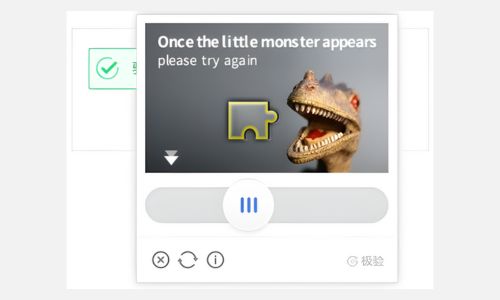
Example: Geetest V3 challenge
How to Solve Geetest V3
Step 1: Extract Geetest Parameters
Find the dynamic Geetest parameters from the target site, typically in the initGeetest function:
Parameters to extract:
- gt - Public site key (usually static)
- challenge - Dynamic token loaded with the CAPTCHA (must be fresh)
- pageurl - Full URL of the current page
- api_server - Optional: API server location (e.g., api-na.geetest.com)
⚠️ CRITICAL: The challenge becomes invalid once loaded or after a timeout. Always get a fresh challenge immediately before solving.
Step 2: Submit the Task to CaptchaAI
Send a GET request to https://ocr.captchaai.com/in.php with the Geetest parameters:
import requests

# Submit the captcha task
params = {
    'key': 'YOUR_API_KEY',
    'method': 'geetest',
    'gt': 'f1ab2cdjja3456116012345b6c78d99e',
    'challenge': '12345678abc90123d45678ef90123a456b',
    'api_server': 'api-na.geetest.com',
    'pageurl': 'https://example.com/page',
    'json': '1'
}

response = requests.get('https://ocr.captchaai.com/in.php', params=params)
result = response.json()
task_id = result['request']
print(f"Task ID: {task_id}")
Step 3: Retrieve the Solution
Wait 15-20 seconds, then poll for the result using a GET request to https://ocr.captchaai.com/res.php:
import time
import json

time.sleep(15)  # Wait 15 seconds

params = {
    'key': 'YOUR_API_KEY',
    'action': 'get',
    'id': task_id,
    'json': '1'
}

response = requests.get('https://ocr.captchaai.com/res.php', params=params)
result = response.json()

if result['status'] == 1:
    solution = json.loads(result['request'])
    print(f"Challenge: {solution['challenge']}")
    print(f"Validate: {solution['validate']}")
    print(f"Seccode: {solution['seccode']}")
Step 4: Submit the Solution
Submit the three values (challenge, validate, seccode) to the target website:
# Using requests to submit the form
data = {
    'username': 'user@example.com',
    'password': 'password123',
    'geetest_challenge': solution['challenge'],
    'geetest_validate': solution['validate'],
    'geetest_seccode': solution['seccode']
}

response = requests.post('https://example.com/api/login', data=data)
print(response.text)
Response Format
JSON Response (with json=1):
{
  "status": 1,
  "request": "{\"challenge\": \"1a2b3456cd67890e12345fab678901c2de\", \"validate\": \"09fe8d7c6ba54f32e1dcb0a9fedc8765\", \"seccode\": \"12fe3d4c56789ba01f2e345d6789c012|jordan\"}"
}
The response contains three critical values:
challenge- Challenge token to submitvalidate- Validation tokenseccode- Security code (format:hash|keyword)
Common Errors
- ERROR_WRONG_USER_KEY: API key is incorrect format. Check your API key (32 characters).
- ERROR_KEY_DOES_NOT_EXIST: API key doesn't exist. Verify your API key.
- ERROR_ZERO_BALANCE: Insufficient account balance. Top up your account to continue.
- ERROR_PAGEURL: pageurl parameter is missing. Provide the full page URL.
- ERROR_WRONG_CAPTCHA_ID: Invalid gt or challenge. Verify the Geetest parameters.
- CAPCHA_NOT_READY: Solution not ready yet. Wait 5 seconds and poll again.
For complete error documentation, see the Error Handling Guide.
Tips & Best Practices
Tip: Always use a fresh challenge - cached or reused challenges cause errors.
Tip: The challenge expires after ~10 minutes, so get a new one immediately before solving.
Tip: Submit the three values promptly after receiving them - they're tightly bound to the original challenge.
Tip: Include the exact pageurl with query parameters if present to match the origin context.
API Reference
For complete API specifications and advanced options, visit the CaptchaAI API Documentation and select Geetest V3 from the sidebar.